If you are working with Java on OS X then you probably should be trying out SoyLatte. SoyLatte is a port of BSD Java for OS X, it is also part of the OpenJDK initiative. It can help you work around the many issues you'll likely have with the 1.6 Java SDK supported by Apple (I couldn't get Woodstox working with RelaxNG schema support).
First off download it. Then you'll probably want to install it somewhere (/usr/local/soylate-xxx should work). Then make sure you have a JAVA_HOME shell var pointing to this folder. Make sure also you add the bin folder to the path.
Getting Eclipse running on SoyLatte is cake. Open the preferences, select "Java > installed JREs", click the 'add' button select the 'MacOS X VM' option and next. You'll now want to point to the SoyLatte folder and finish things off. Select the SoyLatte JRE and close the preferences.
Last thing I'd like to point out. I use CXF to do web services, and found there was an issue with SoyLatte using JAXB 2.0 when I need JAXB 2.1. To solve this I just downloaded the jaxb-api-2.1.jar and jaxws-api-xx.jar and put them into the soylatte/jre/endorsed folder.
Tuesday, January 20, 2009

Tuesday, January 13, 2009
Potion: Installing and Running
New to the computer language scene is Potion. This language is the work of Why (or Why the luck stiff if you like typing) a guy who created a wonderful guide to learning the Ruby programming language.
Potion is a very 'small' language in both terms of lines of code to implement and the tools and API of the language itself. Batteries are not included as they are in well established languages such as Python. NO SWEAT, this of course is why you are interested.
First things first you'll need to have Git installed. Git is source control software. I am on Ubuntu and so I just typed in the command 'sudo apt-get install git-core'. That should do it... oh not on Ubuntu well then go here and figure it out.
Second you are going to need Ragel. Ragel is a state machine compiler. Potion uses it to create the source code tokenizer. Again I used apt-get: 'sudo apt-get install ragel' and voila I had myself some Ragel. You might need to go here and download it or something.
Lastly you need the Potion source. Using Git you will download this. You should be able to type
Now you'll want to change to the 'potion' folder. Type 'make' to start the process of building Potion.
Once finished copy the potion executable create in the make step into your local bin folder. For me that is '/home/rob/bin'. Make sure this folder is on the path. Now you can run potion anywhere. test it out using the command 'potion examples/fib.pn'. This will run the simple fibonacci app in the example folder.
Now you are ready to build a great program!
Potion is a very 'small' language in both terms of lines of code to implement and the tools and API of the language itself. Batteries are not included as they are in well established languages such as Python. NO SWEAT, this of course is why you are interested.
First things first you'll need to have Git installed. Git is source control software. I am on Ubuntu and so I just typed in the command 'sudo apt-get install git-core'. That should do it... oh not on Ubuntu well then go here and figure it out.
Second you are going to need Ragel. Ragel is a state machine compiler. Potion uses it to create the source code tokenizer. Again I used apt-get: 'sudo apt-get install ragel' and voila I had myself some Ragel. You might need to go here and download it or something.
Lastly you need the Potion source. Using Git you will download this. You should be able to type
git clone git://github.com/why/potion.git potionand you'll now have the folder 'potion' containing the sources.
Now you'll want to change to the 'potion' folder. Type 'make' to start the process of building Potion.
Once finished copy the potion executable create in the make step into your local bin folder. For me that is '/home/rob/bin'. Make sure this folder is on the path. Now you can run potion anywhere. test it out using the command 'potion examples/fib.pn'. This will run the simple fibonacci app in the example folder.
Now you are ready to build a great program!
Saturday, January 3, 2009
MySQL and Unicode
I just wanted to point out. MySQL STILL uses ISO-Latin-1 as the default encoding. LAME!!! I ran into again the problem today of having to set up my production database to use UTF-8. Not a difficult thing, but a hassle none the less. The thing is in these days everyone is using UTF-8, I mean i18n and l13n are two big deals. Some web programming frameworks make it a huge point of how well they handle the two.
Well anyway what to do? I had already created the database and tables, in the default ISO-Latin-1 encoding, and there was a few months of data in them. Therefore I had to start by fixing the encoding on the database and tables. Here are the commands that can make this happen:
So crack open the my.cnf and insert this line:
Well anyway what to do? I had already created the database and tables, in the default ISO-Latin-1 encoding, and there was a few months of data in them. Therefore I had to start by fixing the encoding on the database and tables. Here are the commands that can make this happen:
alter table xxx character set = utf8;Of course insert your table and database names. Now any new tables created in the database will have utf8 encoding. You probably WANT to make sure that everything in your database is UTF-8. The best way I know of doing this is my setting the proper values in the my.cnf file in /etc. If the file is not in /etc then you probably will need to create it. If someone else admins the machine and installed mysql there is a possibility also that the file is in another castle, er sorry location.
alter database xxx character set = utf8;
So crack open the my.cnf and insert this line:
default-character-set=utf8Thats it, restart MySQL. To test this out create a new database, then a table in the database. Issue the 'show create table xxx' where xxx is the table name, you should see some text indicating it has UTF-8 as the encoding.
URL Encoding in Tomcat
I'm working on a new feature at blueleftistconstructor (BLC) that is sorta like del.icio.us. The gist is this feature allows a member to create 'bookmarks' in their account on the site. Bookmarks can then be accessed from anywhere one can access BLC.
I created a bookmarklet that when invoked from any webpage will redirect to BLC and save the page as a bookmark. This is pretty clutch as it makes bookmarking a lot easier. I coded up this bookmarklet awhile ago but found a bug just the other day. Any site that had a title containing Unicode characters would cause the title to freak out. In the save bookmark form the characters where getting butchered.
Well it took a hour or so to troubleshoot the problem. It ends up that Tomcat (the Java webserver I host the site app in) uses ISO-Latin-1 (ISO-8859-1) when decoding URLs. Well that makes sense of why the Unicode characters where lost. As luck would have it I kinda guessed this was the issue and found this great post. If you are experiencing such issues just follow the directions in the post and you'll be fine.
I created a bookmarklet that when invoked from any webpage will redirect to BLC and save the page as a bookmark. This is pretty clutch as it makes bookmarking a lot easier. I coded up this bookmarklet awhile ago but found a bug just the other day. Any site that had a title containing Unicode characters would cause the title to freak out. In the save bookmark form the characters where getting butchered.
Well it took a hour or so to troubleshoot the problem. It ends up that Tomcat (the Java webserver I host the site app in) uses ISO-Latin-1 (ISO-8859-1) when decoding URLs. Well that makes sense of why the Unicode characters where lost. As luck would have it I kinda guessed this was the issue and found this great post. If you are experiencing such issues just follow the directions in the post and you'll be fine.
Tuesday, October 28, 2008
Openssl, when checking a digest...
I've been working on my own implementation of SHA-1 hashing function. In the bigger picture I've put together a mostly working OAuth client using Groovy, and part of that is using HMAC-SHA1 to compute a secret value. Well I started by using the built in Java version but decided i would create my own... this is good exercise.
So first thing I did was write some unit tests. I needed SHA1 hashes to start with to make sure that my algorithm implementation works. The obvious choices are either sha1sum or openssl. I'm on a iMac running Leopard, and by default openssl is installed. I used that to compute some hash values. Unfortunately for me I spent a lot of time trying to get my algorithm working when it was already working. The problem was I computed the values wrong with openssl. I used the following:
echo "the quick fox jumps the brown dog" | openssl sha1
Which gave me a incorrect value. Why you ask? Well I didn't remember the -n flag and a newline character was being included in the string passed to openssl. Ooops! Well once I added the -n flag everything was fine and I now have a number of hash values to use in my tests.
So first thing I did was write some unit tests. I needed SHA1 hashes to start with to make sure that my algorithm implementation works. The obvious choices are either sha1sum or openssl. I'm on a iMac running Leopard, and by default openssl is installed. I used that to compute some hash values. Unfortunately for me I spent a lot of time trying to get my algorithm working when it was already working. The problem was I computed the values wrong with openssl. I used the following:
echo "the quick fox jumps the brown dog" | openssl sha1
Which gave me a incorrect value. Why you ask? Well I didn't remember the -n flag and a newline character was being included in the string passed to openssl. Ooops! Well once I added the -n flag everything was fine and I now have a number of hash values to use in my tests.
Thursday, October 16, 2008
Eclipse, Tomcat, Sysdeo and the DevLoader (and a little Maven)
If you are developing a webapp in Eclipse there is a very good chance you are using Sysdeo. If you are not there is a very good chance you have not yet learned a proper way to debug a Java web application (or maybe you are using Jetty?). Sysdeo is really the only good open source, free Eclipse plugin for developing with Tomcat. It allows a simple way to debug your code in Eclipse while it runs in Tomkitty, a very nice thing.
Now the problem with the plugin out right is your project must be laid out like an exploded war... YUCK! This is because Sysdeo will be looking for the lib files under WEB-INF/lib and such. Often I've seen this lead to some truly horrible project organization, where jsp and Ant build files co-mingle in the same folder!?!
Most of us use a sane Ant or Maven project layout that is standardized across all our Java projects. If you want to continue doing so and leverage the benefits of Sysdeo then you will need the DevLoader installed.
If you haven't downloaded and installed the Sysdeo plugin do so now, I will wait ;)
Go here to get Sysdeo!
Ok once installed you should see 3 icons under the Eclipse menu bar that look very familiar (they are Tomcats!). The first icon starts Tomcat, the second stops it and the third restarts. Now open the Eclipse preferences menu. You should see the "Tomcat" entry. Open it and configure the plugin based on your Tomcat installation. You will want the "Context Declaration mode" to be "context" in my experience. It just makes things a lot cleaner if you use Tomcat for other projects/apps, where they each have individual files rather being crammed in server.xml. That should be about all you need to know. Oh the sub-menu 'Source path' is for adding the source files used in debugging, so make sure your project is in there if you want to be able to see the files while debugging.
Next up the DevLoader. It came with the Sysdeo plugin when you download it! You should find a zip file in the the Sysdeo zip aptly named Devloader.zip. Unzip it. It will create an org folder, within lies some classes. Jar this sucker up:
This should create a jar for the DevLoader. Now throw this in your Tomcat instance's lib folder.
Great now you have almost everything you need to get started. Lets go over an example of a Maven project being used.
In Maven the webapp files go in src/main/webapp by convention, and sources go in src/main/java, and the resource files (xml, properties) go into src/main/resources. For your Maven project you would right click the project and select properties. You should now notice a 'Tomcat' entry in the config options. Select this.
Enable the "Is a Tomcat Project" checkbox. For the 'context name' use whatever sane value you prefer. Near the bottom area you will want to enter 'src/main/webapp' for the app root. This is where most jsp, html, javascrpt, css and whatnot will be. You will be able to update these and see the result. Now the last thing we need to do is activate the devloader. Here is a picture of what that looks like:
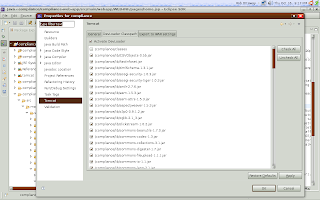
So really all you do is add the jar files needed. Thats it. Now save. If you are not going to create a context file yourself, and you enabled 'can update context definition' in the projects tomcat properties you can right click the project and select "tomcat project > update context definition". This will automatically create the proper context file for Tomcat, so that it uses the DevLoader and your project. You almost certainly will want to do this. Note you can further alter the automatically created context file afterwards.
Now the problem with the plugin out right is your project must be laid out like an exploded war... YUCK! This is because Sysdeo will be looking for the lib files under WEB-INF/lib and such. Often I've seen this lead to some truly horrible project organization, where jsp and Ant build files co-mingle in the same folder!?!
Most of us use a sane Ant or Maven project layout that is standardized across all our Java projects. If you want to continue doing so and leverage the benefits of Sysdeo then you will need the DevLoader installed.
If you haven't downloaded and installed the Sysdeo plugin do so now, I will wait ;)
Go here to get Sysdeo!
Ok once installed you should see 3 icons under the Eclipse menu bar that look very familiar (they are Tomcats!). The first icon starts Tomcat, the second stops it and the third restarts. Now open the Eclipse preferences menu. You should see the "Tomcat" entry. Open it and configure the plugin based on your Tomcat installation. You will want the "Context Declaration mode" to be "context" in my experience. It just makes things a lot cleaner if you use Tomcat for other projects/apps, where they each have individual files rather being crammed in server.xml. That should be about all you need to know. Oh the sub-menu 'Source path' is for adding the source files used in debugging, so make sure your project is in there if you want to be able to see the files while debugging.
Next up the DevLoader. It came with the Sysdeo plugin when you download it! You should find a zip file in the the Sysdeo zip aptly named Devloader.zip. Unzip it. It will create an org folder, within lies some classes. Jar this sucker up:
jar cf devloader.jar org/
This should create a jar for the DevLoader. Now throw this in your Tomcat instance's lib folder.
Great now you have almost everything you need to get started. Lets go over an example of a Maven project being used.
In Maven the webapp files go in src/main/webapp by convention, and sources go in src/main/java, and the resource files (xml, properties) go into src/main/resources. For your Maven project you would right click the project and select properties. You should now notice a 'Tomcat' entry in the config options. Select this.
Enable the "Is a Tomcat Project" checkbox. For the 'context name' use whatever sane value you prefer. Near the bottom area you will want to enter 'src/main/webapp' for the app root. This is where most jsp, html, javascrpt, css and whatnot will be. You will be able to update these and see the result. Now the last thing we need to do is activate the devloader. Here is a picture of what that looks like:

So really all you do is add the jar files needed. Thats it. Now save. If you are not going to create a context file yourself, and you enabled 'can update context definition' in the projects tomcat properties you can right click the project and select "tomcat project > update context definition". This will automatically create the proper context file for Tomcat, so that it uses the DevLoader and your project. You almost certainly will want to do this. Note you can further alter the automatically created context file afterwards.
Monday, October 13, 2008
Sorting using Haskell
Last Friday night I had some fun writing sorts in Haskell. Yes thats right I spent my Friday night working on some rudimentary algorithms in an obscure computer language. Lets just say I'm in to that kinda thing. Oh well it beats being addicted to cough syrup.
So Haskell is fun. There I said it. It is the kinda language which lends much balance to ones style, is one is a imperitive/OO language flunky. The ideas in Haskell seem bizarre at first but become beautiful as they sink in. Sink they do, lets look at the first sort, the almighty BUBBLE SORT
I imagine that looks weird. Well it should, if you are unaccustomed to Haskell. The syntax is much different than any OO language. I've had people tell me Python is too weird looking. Well this would just frighten those types of people silly. Lets talk about this code
The first thing to point out is the signature. In leyman's terms this says "take a list of something and return a list of something". The last [t] is going to be what is returned. The '(Ord t)' says that t must be of the typeclass 'Ord' as in 'Ordinality' which is related to being able to compare values. Don't worry too much about that for now, just know it allows us to do things like '>', '<', '==' and so on.
The rest is easy to explain. The bubbleSort function will loop x times, x being the length of the list to be sorted. For a list of 10 elements we loop 10 times. Each time we loop we call bubble. See the loop function takes a number (a) and a function (t -> t), and finally a value (t). What we end up doing here is calling loop again with the number decremented by one. We call bubble on the value, then passing the result right back into bubble IF the number is greater than 0.
This bubble function will go through the list comparing each pair elements, starting with the first and second, and swapping them if the first is greater than the second. This causes the largest value to 'bubble up' to the top of the list.
So Haskell is fun. There I said it. It is the kinda language which lends much balance to ones style, is one is a imperitive/OO language flunky. The ideas in Haskell seem bizarre at first but become beautiful as they sink in. Sink they do, lets look at the first sort, the almighty BUBBLE SORT
-- Implementation of a bubble sort in Haskell
bubbleSort :: (Ord t) => [t] -> [t] -- signature
bubbleSort a = loop (length a) bubble a

bubble :: (Ord t) => [t] -> [t]
bubble (a:b:c) | a < b = a : bubble (b:c)
               | otherwise = b : bubble (a:c)
bubble (a:[]) = [a]
bubble [] = []

loop :: (Num a, Ord a) => a -> (t -> t) -> t -> t
loop num f x | num > 0 =  loop (num-1) f x'
             | otherwise = x
             where x' = f x
I imagine that looks weird. Well it should, if you are unaccustomed to Haskell. The syntax is much different than any OO language. I've had people tell me Python is too weird looking. Well this would just frighten those types of people silly. Lets talk about this code
The first thing to point out is the signature. In leyman's terms this says "take a list of something and return a list of something". The last [t] is going to be what is returned. The '(Ord t)' says that t must be of the typeclass 'Ord' as in 'Ordinality' which is related to being able to compare values. Don't worry too much about that for now, just know it allows us to do things like '>', '<', '==' and so on.
The rest is easy to explain. The bubbleSort function will loop x times, x being the length of the list to be sorted. For a list of 10 elements we loop 10 times. Each time we loop we call bubble. See the loop function takes a number (a) and a function (t -> t), and finally a value (t). What we end up doing here is calling loop again with the number decremented by one. We call bubble on the value, then passing the result right back into bubble IF the number is greater than 0.
This bubble function will go through the list comparing each pair elements, starting with the first and second, and swapping them if the first is greater than the second. This causes the largest value to 'bubble up' to the top of the list.
Subscribe to:
Posts (Atom)